October 25, 2026 · 7 min read
Chasing Optimism
Vibe coding tools weren't built for designers, so I built one that is.
From early 2025 on, I was an optimist about vibe coding. Every few weeks a new tool promised that I could describe an interface and get working software back. Lovable, v0, Figma Make, and others. I tried each of them in my day-to-day work, sure that this one would finally keep up with how designers actually work.
None of them did. This essay is about how long I kept chasing that optimism, why it kept running out, and what I built when I stopped waiting.
Built for someone else
The tools weren't bad. They were built for someone else. Their mental model is an engineer's: a repository, a stack, a terminal-shaped chat that rewrites files. That's a fine model when the goal is "make it work." A designer's goal is "make it right," and right covers a lot of ground that these tools treat as decoration.
Here's what my days looked like:
- Wrong tokens. Colors, spacing, and radius drifted from the system I was designing in. Every draft started with an audit of values that should never have been wrong.
- Poorly skinned components. I'd ask for a real component library and get Shoelace components dressed up to look roughly like it. Close enough to pass a glance, wrong enough to fail a review.
- Assets by hand. Fonts, images, and icons lived outside the tool, so I copied, uploaded, and re-linked them over and over.
- Meaningless iterations. Asking to fix one button often rewrote the whole screen. A revision cost a new round of checking everything that had been right a minute earlier.
- Gaps everywhere. No way to point at the element I meant, no way to compare a draft to the one before it, no way to leave a note on the canvas.
So I made up the difference myself. Twelve to eighteen hour days, revising generated work by hand until it met the bar I hold for user interface design. The tools were supposed to save time. For me, they moved the hard part to the end of the day and made it longer.
Where the optimism went
Eventually I stopped waiting for a tool to understand design and started working with an agent that could understand me. I moved my prototyping into Claude Code.
The difference wasn't the model. It was control. In Claude Code I could hand the agent my design rules, point it at the real components, tell it exactly which element to change, and make it check its own work before showing me anything. I could write my decisions down once and have every later session start from them. The quality went up because I was finally steering instead of cleaning up.
That workflow became an agent harness I've written about before: it reads a design system's rules, drafts prototypes from production components, and validates them before a person reviews anything. It worked. But it lived in a terminal, in a repository, in a setup only someone with my background would put together. The people I most wanted to have it, designers, would never touch it.
A tool meant for designers
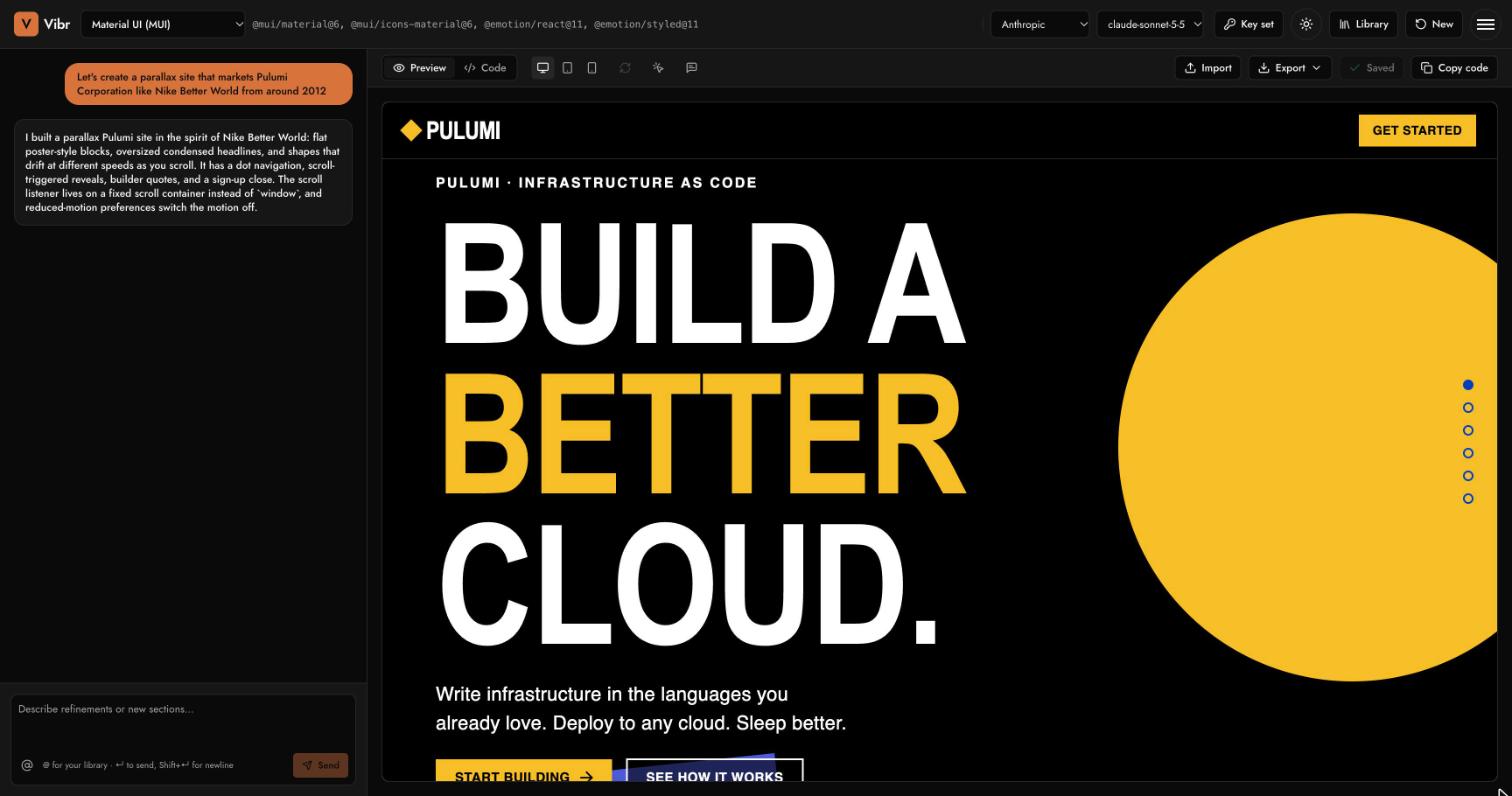
So I built Vibr: the same loop, in the browser, shaped around how designers work.
You describe a screen and pick a real design system from npm: Material UI, Ant Design, Fluent UI, Mantine, Shoelace, Octuple, or your own package. An agent plans the screen, builds it from the actual components, checks that it renders, and repairs it before handing you a draft. You watch the canvas draw as the code is written. Bring your own Gemini, OpenAI, or Anthropic key; it stays in your browser.
Each frustration from those long days became a feature:
- Tokens that are right from the start. A theme generator builds light and dark palettes from your base colors and solves every role to WCAG 2.2 contrast. You can also import tokens you already have, from W3C design tokens, Tokens Studio, or Style Dictionary.
- Real components, really checked. Drafts use the design system's own package, not a look-alike. One of the first bugs we caught was Shoelace components that never loaded while the check reported success. Now the check fails when a component isn't real.
- Assets in the library. Your fonts, images, and icon fonts live beside your prototypes, along with Unsplash photos. Mention one in the prompt and it shows up in the draft.
- Iterations that mean something. Click any element on the canvas and ask for a change to just that element; the rest stays put. Compare a draft to the one before it with a slider, and undo when a revision goes the wrong way.
- A design review on every run. After the build, Vibr checks accessibility and layout at desktop, tablet, and phone widths, and repairs what it finds once before you see it.
- Annotations. Pin feedback or notes to any element. Open feedback carries into the next version until you close it, and Fix with AI hands it to the agent with the exact element attached.
- Flows and exports. Link screens into a flow you can play, and export a prototype as a working web app, with or without its annotations.
None of that is engineering for its own sake. It's the list of things I used to do by hand at the end of those long days.
How fast it came together
The first commit landed on a Thursday afternoon. Vibr was live on this site under four hours later. By Sunday, under three days after that first commit, it had shipped to production nineteen times: live drawing, the library, themes, tokens, click-to-select, design review, flows, and annotations.
That speed is the point of the essay, not a footnote to it. I set the direction, made the design calls, and reviewed every change. Claude Code wrote most of the code, with Gemini drafting some of the first modules. I didn't spend those days fixing generated work. I spent them deciding what Vibr should be.
Why I could build it
Vibr sits where my skills overlap. I'm a product designer with deep engineering experience, and this tool needed both halves at once.
The design half knew what was missing, because I'd lived with every gap. It also knew what a design system is for. I've founded one, Octuple at Eightfold, and authored the token foundation for another. That's why Vibr treats tokens, contrast, and real components as the core of the product, not settings.
The engineering half made it buildable and safe: generated code runs in a sandboxed frame, your keys never leave your browser except to reach the provider, and the agent's steps are visible in the chat so you can see what it did and why.
Many AI tools for creatives start from the technology and work toward the people. I started from the people.
What comes next
Vibr is free to try with your own key at beneficialmedia.com/vibr. Anyone can use it, not just designers, but designers are who it's for.
I hope to grow it into a business someday. Shared links, accounts, and comments from more than one person are the natural next steps, and they'll come when people are using it enough to need them. The reason I'll keep going is the same reason I started: I care about design, and the people who do it deserve tools that hold up to their bar.
The optimism didn't run out. It just needed somewhere to go.
Dylan